 Driv.one
Help centre
Driv.one
Help centre
checking…
Driv.one
Help centre
Put your vehicle in your account to keep its maintenance, costs and documents together.
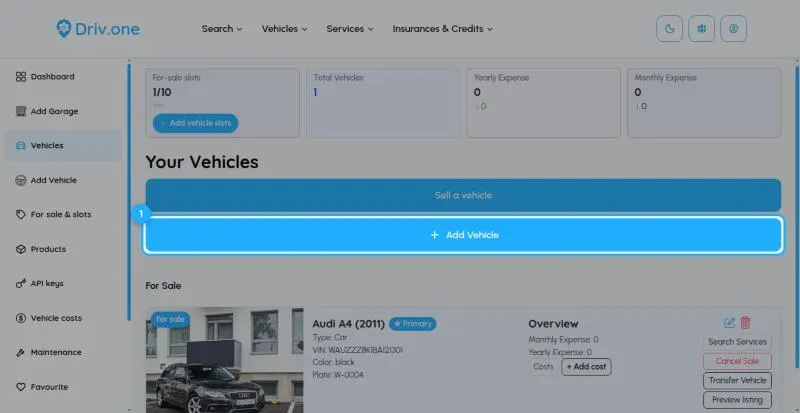
In your dashboard choose Add Vehicle in the menu, or open Vehicles and click Add Vehicle.
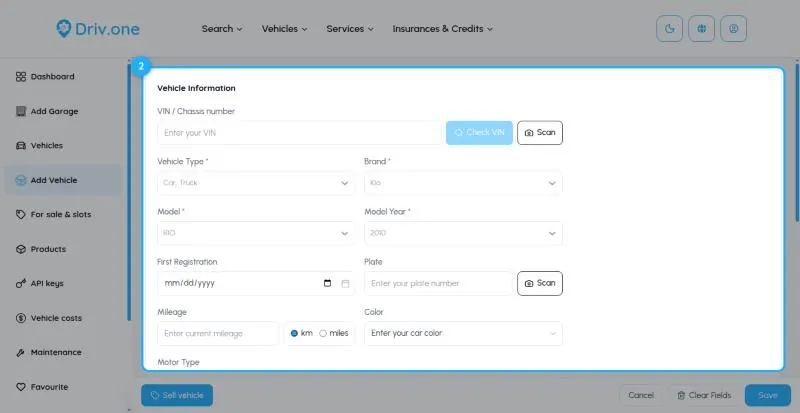
Under Vehicle Information, the vehicle type, brand, model and model year are required. Tip: enter the VIN (chassis number) and click Check VIN to fill in the details automatically. Add the plate, first registration, mileage (km or miles) and colour; engine, exterior and interior options are optional.
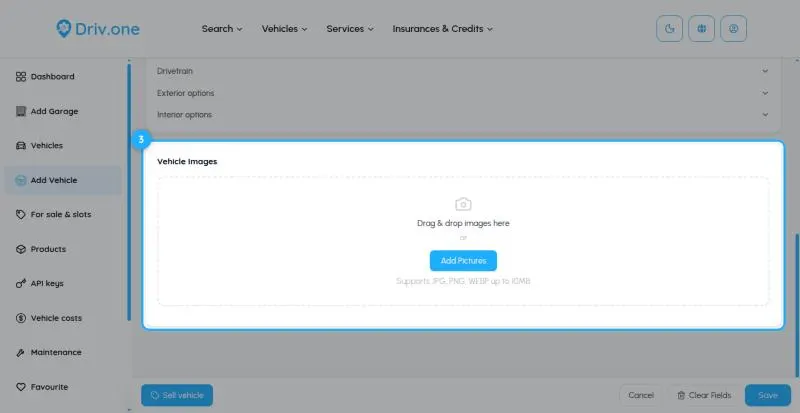
Under Vehicle Images, drag photos in or click Add Pictures (JPG, PNG or WEBP up to 10 MB). The first photo is the main one; drag to change the order. Click Save.
Send us a message through the contact form on driv.one. Pick the topic that fits best so it reaches the right person.
Contact usWe've received your message and will get back to you.